
TextSeek2.18.3760 - Download
You'll be able to download in few seconds.
Publisher Description
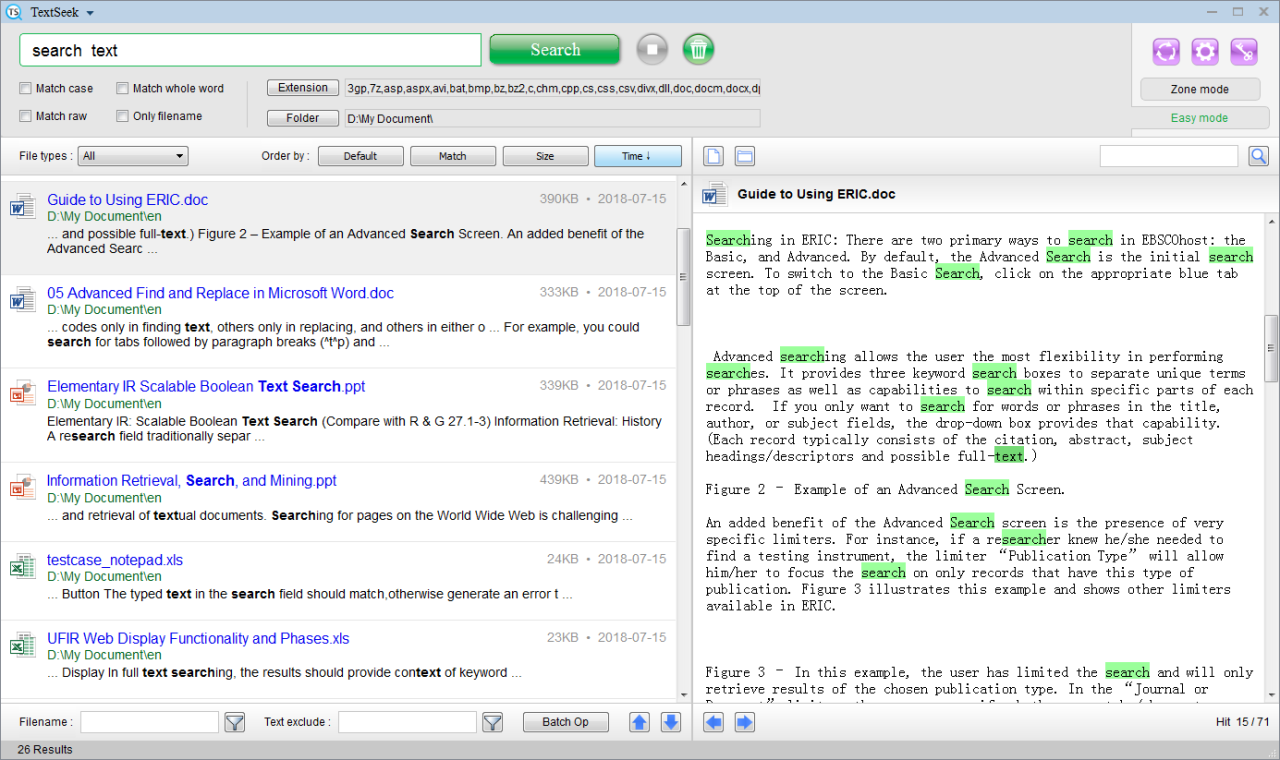
TextSeek is a professional file search tool. Unlike the filename search tool like Everything and Listary, TextSeek can search filename and file content simultaneously. It supports PDF, Word, Excel, Powerpoint, RTF and other formats. The software can run directly, and no extra package is required to install.
Official website: https://www.textseek.net/
1. Minimalist design. The search box and results are as intuitive as Google, and the operation is convenient. You can preview the file content with highlighted keywords, and you can quickly browse the search results with ctrl+arrow shortcut keys.
2. Double search modes. Users can search directly without indexing (Easy mode), or index specific directories to speed up searching (Zone mode).
3. Cross-platform and multi-language. It supports Windows and Mac OS systems, and it can search through all languages by using UNICODE. The user interface supports Chinese, English, Japanese, Korean, French, German, Arabic and other languages.
4. Multiple search options. The results can be filtered by document type, file name, or file content. They can be also sorted by file size, modification time or relevance. TextSeek uses full-text search technology, so it supports case matching, whole word matching, and original query matching.
5. Batch processing. You can copy, cut and delete the search result files in batch, and you can also export all the search result information into a csv file.
About TextSeek
This Office Suites & Tools program is available in English, Arabic, Chinese, ChineseSimplified, ChineseTraditional, Dutch, French, German, Italian, Japanese, Korean, Portuguese, Spanish, Swedish, Turkish. It was last updated on 29 September, 2026. TextSeek is compatible with the following operating systems: Windows.
The company that develops TextSeek is Zesite Company. The latest version released by its developer is 2.18.3760.
The download we have available for TextSeek has a file size of 51.4 MB. Just click the green Download button above to start the downloading process. The program is listed on our website since 2023-04-21 and was downloaded 0 times. We have already checked if the download link is safe, however for your own protection we recommend that you scan the downloaded software with your antivirus. Your antivirus may detect the TextSeek as malware if the download link is broken.
How to install TextSeek on your Windows device:
- Click on the Download button on our website. This will start the download from the website of the developer.
- Once the TextSeek is downloaded click on it to start the setup process (assuming you are on a desktop computer).
- When the installation is finished you should be able to see and run the program.
Program Details
General
System requirements
Download information
Pricing
Version History
version 2.18.3760
posted on 2023-04-21
Disclaimer
External Download
We do not host TextSeek on our servers. We did not scan it for viruses, adware, spyware or other type of malware. This app is hosted by the software publisher and passed their terms and conditions to be listed there. We recommend caution when installing it.
The external download link for TextSeek is provided to you by apps112.com without any warranties, representations or guarantees of any kind, so access it at your own risk.
If you have questions regarding this particular app contact the publisher directly. For questions about the functionalities of apps112.com contact us.
